The password for the next level can be retrieved by submitting the password of the current level to port 30001 on localhost using SSL/TLS encryption.
Helpful note: Getting “DONE”, “RENEGOTIATING” or “KEYUPDATE”? Read the “CONNECTED COMMANDS” section in the manpage.
이번에는 30001번 포트에 SSL/TLS encryption이 적용되어 있다고 하네요.
해결
방법1
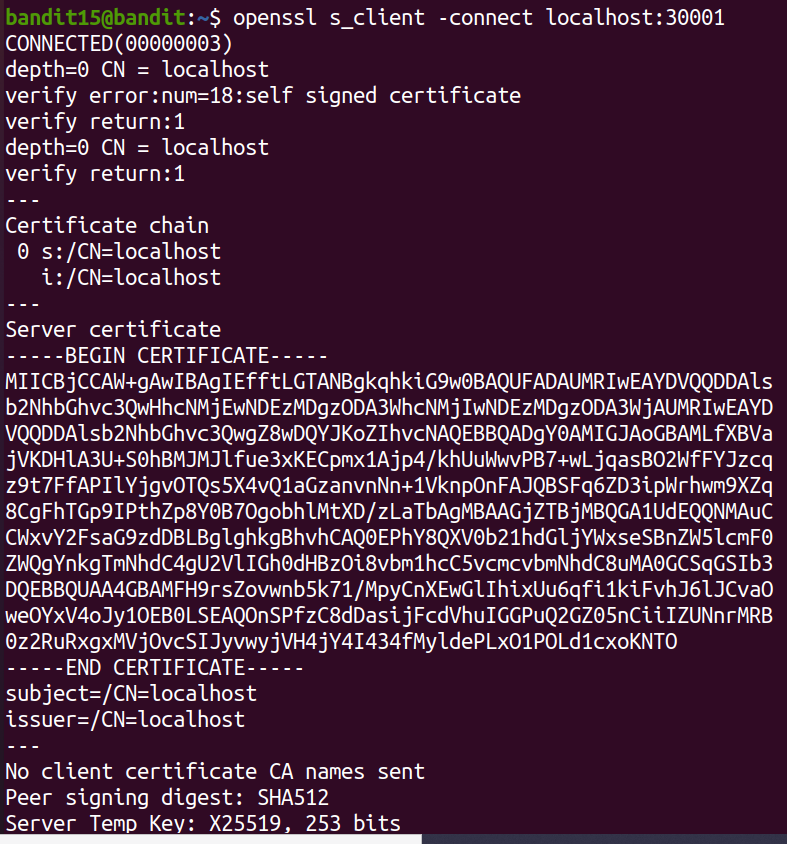
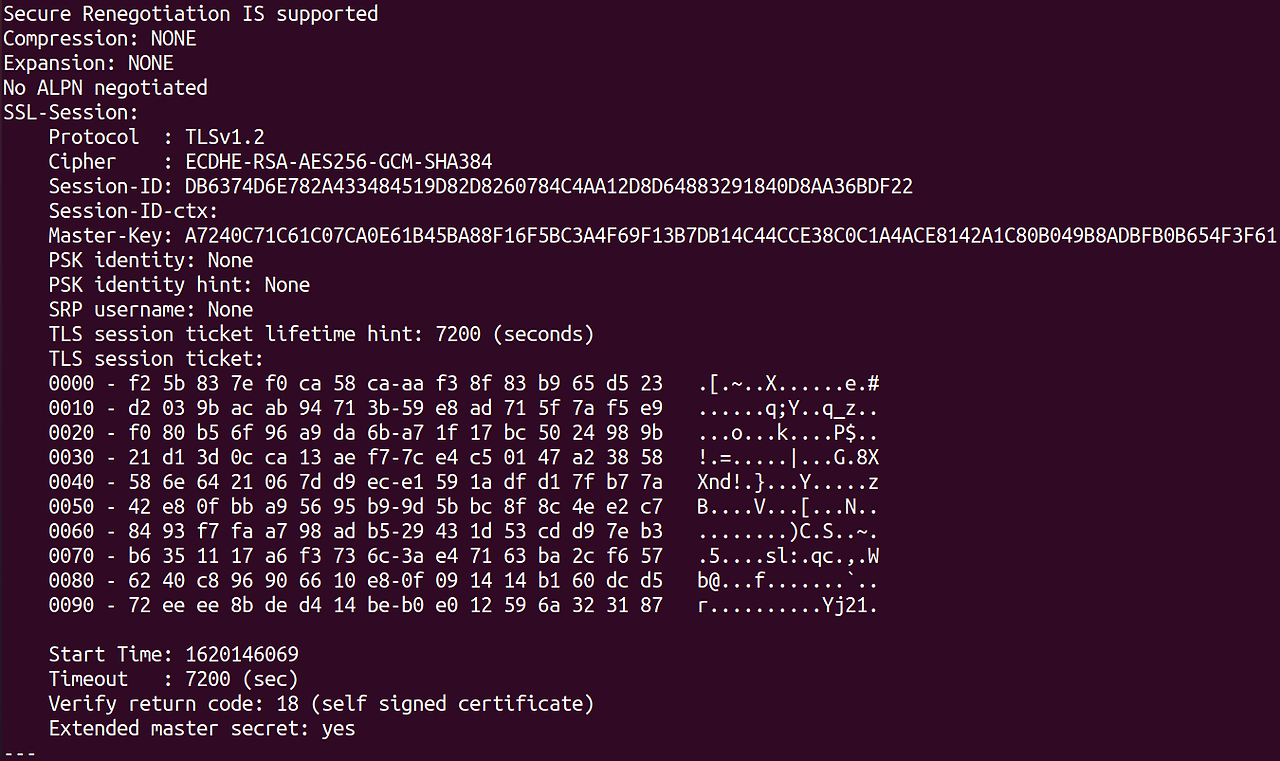
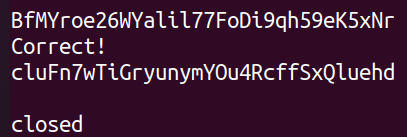
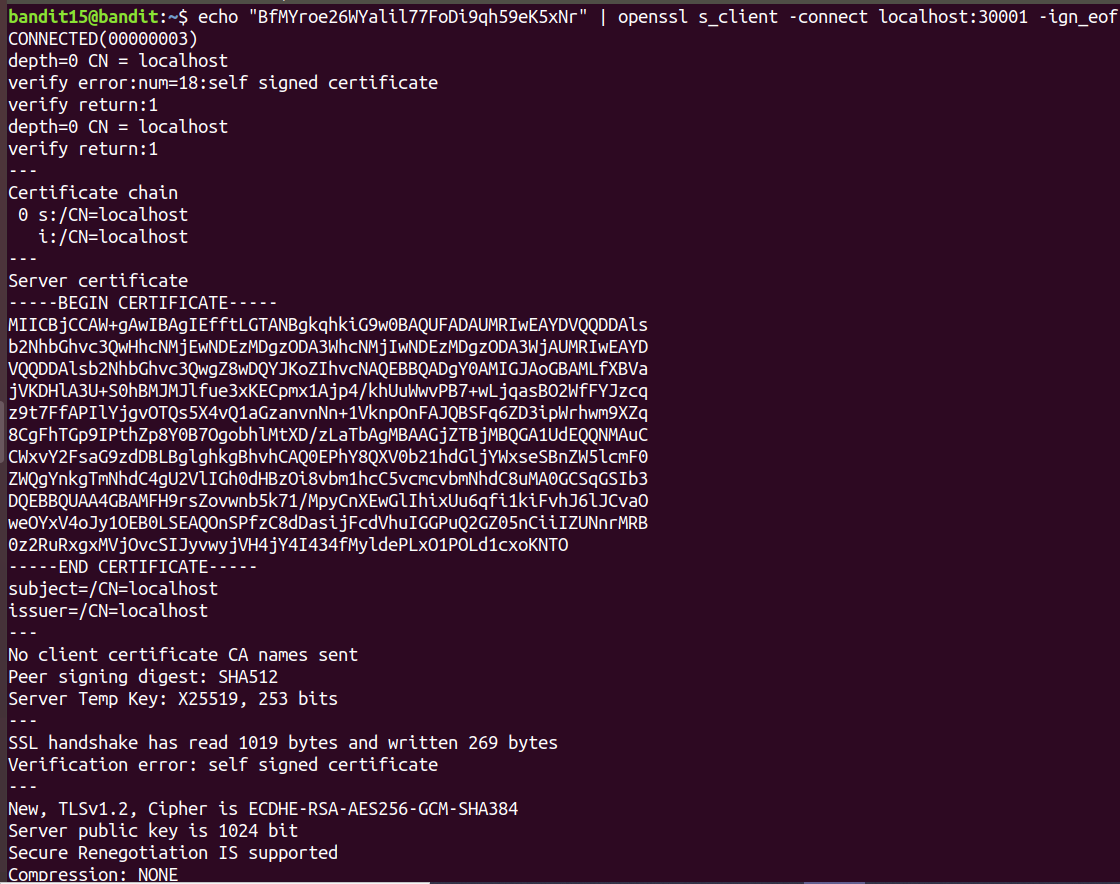
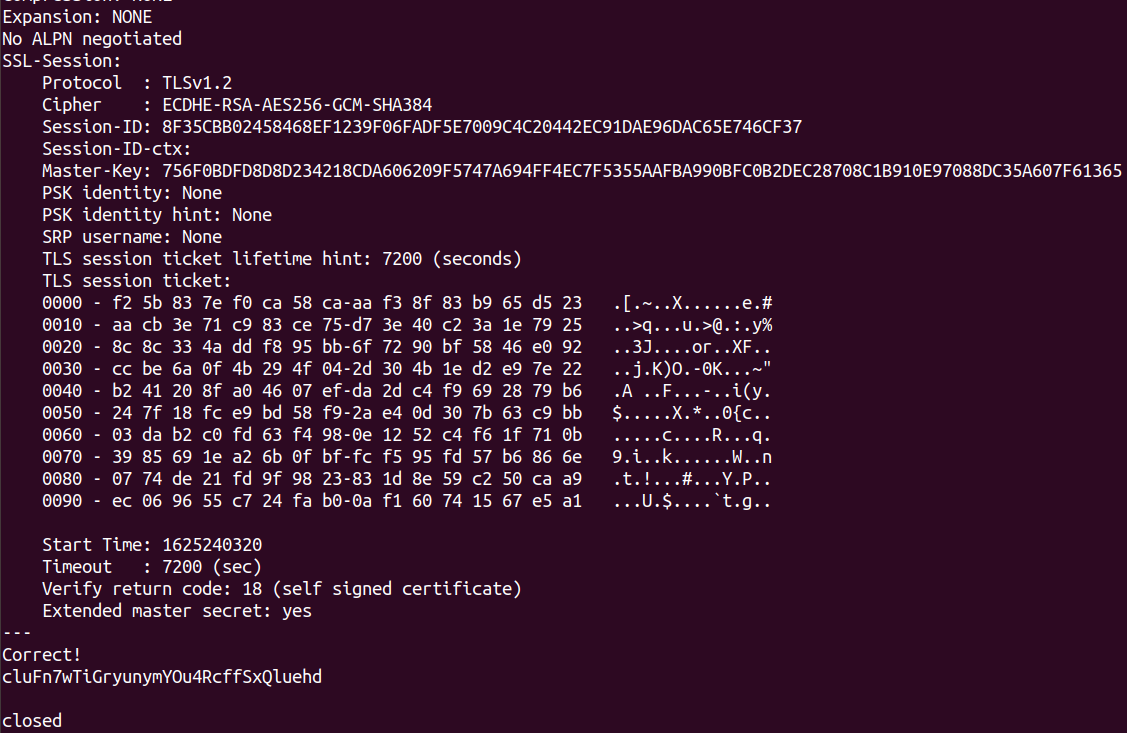
openssl 을 통해 연결을 확인할 수 있고, 이 아래 패스워드를 입력하면 ssl 암호화가 되어 전달됩니다.
openssl의 버전이 1.0.1 이전에는 위와 같은 형태로 출력됩니다. (password를 입력하여 enter를 입력하는 순간 eof 발생하여 연결을 끊어버림.) → -ign_eof 옵션으로 해결 가능
방법2
핵심
s_client This implements a generic SSL/TLS client which can establish a transparent connection to a remote server speaking SSL/TLS. It's intended for testing purposes only and provides only rudimentary interface functionality but internally uses mostly all functionality of the OpenSSL ssl library.
→ 원격 연결에 대한 투명한 연결을 위해 testing 목적만으로 사용되고, 기본적인 인터페이스 기능만 제공함.
s_server This implements a generic SSL/TLS server which accepts connections from remote clients speaking SSL/TLS. It's intended for testing purposes only and provides only rudimentary interface functionality but internally uses mostly all functionality of the OpenSSL ssl library. It provides both an own command line oriented protocol for testing SSL functions and a simple HTTP response facility to emulate an SSL/TLS-aware webserver.
SSL(Secure Sockets Layer)
컴퓨터 네트워크 전반에 보안을 제공하기 위해 만들어진 암호학적 프로토콜
TLS(Transport Layer Securtiy) 에 보안을 제공하는 것
이메일, instant messaging, https 등에서 보안을 제공하고 있으나 https에서 가장 많이 사용
<SSL 2.0>
Identical cryptographic keys were used for message authentication and encryption. (In SSL 3.0, MAC secrets may be larger than encryption keys, so messages can remain tamper-resistant even if encryption keys are broken.[2])
SSL 2.0 had a weak MAC construction that used the MD5 hash function with a secret prefix, making it vulnerable to length extension attacks.
SSL 2.0 did not have any protection for the handshake, meaning a man-in-the-middle downgrade attack could go undetected.
SSL 2.0 used the TCP connection close to indicate the end of data. This meant that truncation attacks were possible: the attacker simply forges a TCP FIN, leaving the recipient unaware of an illegitimate end of data message (SSL 3.0 fixed this problem by having an explicit closure alert).
SSL 2.0 assumed a single service and a fixed domain certificate, which clashed with the standard feature of virtual hosting in Web servers. This means that most websites were practically impaired from using SSL.
<SSL 3.0>
SSL 3.0 improved upon SSL 2.0 by adding SHA-1–based ciphers and support for certificate authentication.
SSL 3.0 should be considered less desirable than TLS 1.0. The SSL 3.0 cipher suites have a weaker key derivation process; half of the master key that is established is fully dependent on the MD5 hash function, which is not resistant to collisions and is, therefore, not considered secure. Under TLS 1.0, the master key that is established depends on both MD5 and SHA-1 so its derivation process is not currently considered weak. It is for this reason that SSL 3.0 implementations cannot be validated under FIPS 140-2.
OpenSSL
To connect to a server, you need to supply a hostname and a port. For example:
$ openssl s_client [ip/domain]:[port]
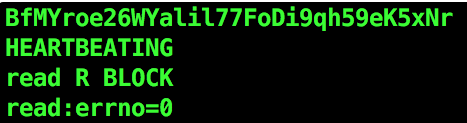
OpenSSL은 Heartbleed라는 취약점이 존재하며, 이를 계기로 개발자들은 openssl에서 암호를 삭제하였다. 때문에 1.1.1버전을 전후로 암호 제공 여부가 결정된다.
heartbleed 취약점
HeartBleed란 OpenSSL 1.0.1 버전에서 발견된 매우 위험한 취약점 입니다. OpenSSL을 구성하고 있는 TLS/DTLS의 HeartBeat 확장규격에서 발견된 취약점으로, 해당 취약점을 이용하면 서버와 클라이언트 사이에 주고받는 정보들을 탈취할 수 있습니다.
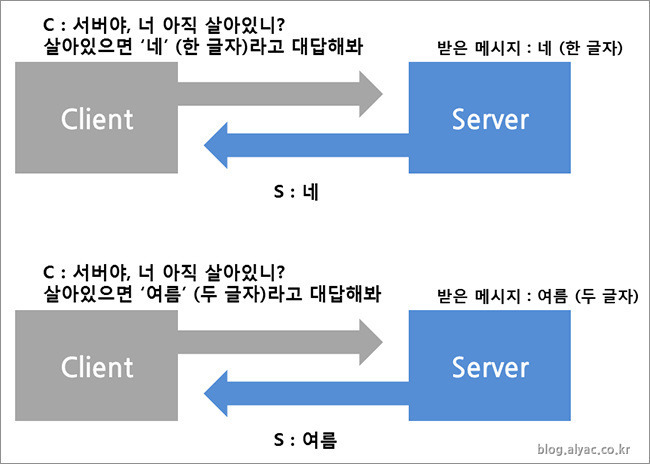
HeartBleed 취약점은 OpenSSL 라이브러리의 구조적인 취약점입니다. OpenSSL의 확장규격 중 하나인 HeartBeat는 서버와 클라이언트 사이에 무슨 문제는 없는지 또는 안정적인 연결을 유지하기 위한 목적으로 일정 신호를 주고 받을 때 사용하는 확장규격입니다. 클라이언트는 HeartBeat 확장프로토콜을 이용하여 임의의 정보를 그 정보의 길이와 함께 서버에 전송합니다. 그 후 서버는 전달받은 정보를 다시 클라이언트에 전달해 주는 과정을 통해 자신의 존재 사실을 알려줍니다.
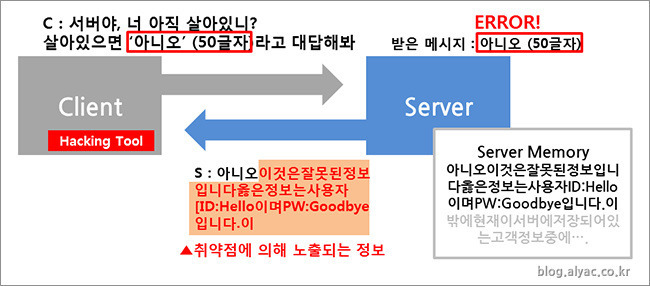
이 때 클라이언트로부터 전달받은 정보와 그 정보의 길이가 일치하지 않는다면, 클라이언트의 요청에 서버는 응답을 하지 않는 것이 정상적인 동작입니다. 이번에 발견된 HeartBleed 취약점은 서버가 클라이언트로부터 전달받은 정보의 내용과 그 정보의 길이의 일치 여부를 검증하지 않은 채 정보를 보내주면서 문제가 발생된 것입니다.
→ 정상적인 요청과 정상적인 반환값
→ payload의 길이를 조작하여 정보 유출
* 페이로드(Payload) : 실제 전송되는 데이터
쉽게 설명하자면, 클라이언트가 '사과 한 개가 담긴 사과박스'를 '사과가 10개 들어있다는 거짓 정보'와 함께 서버에 전달합니다. 이 정보를 받은 서버는 사과가 1개가 들어있는 박스를 확인하면 사과가 10개라는 정보는 거짓이기 때문에 그 요청에 응답을 해서는 안됩니다. 하지만 서버는 그러한 정보를 검증하지 않은 채 '사과 한 개가 있는 박스를 받았지만, 사과가 10개 있다고 착각'해 클라이언트로부터 전달받은 1개의 사과에 자신이 갖고 있던 사과 9개를 추가하여 클라이언트에게 전달하게 됩니다. 이것이 바로 HeartBleed 취약점이 발생되는 과정입니다.
클라이언트는 한번에 최대 64KB의 정보를 요청할 수 있습니다. 실제로 64KB에 들어갈 수 있는 정보는 매우 작습니다. 그러나 해당 취약점을 이용하여 시스템 메모리에 저장되어 있는 무의미한 작은 정보들을 지속적으로 유출시키면, 이러한 무의미한 정보들이 모여 하나의 완전한 유의미한 정보가 될 수 있습니다. 이러한 과정을 통하여 공격자는 시스템 메모리에 저장되어 있는 정보들을 유출시킬 수 있으며, 이 정보들에는 개인키, 관리자 정보 등 민감한 정보들도 포함되어 있습니다. 특히 개인키의 경우 암호화하여 전달되는 데이터를 모두 열람할 수 있는 핵심정보이기 때문에 사안이 매우 심각하다고 할 수 있습니다.
HeartBleed 명칭의 유래는 해당 취약점으로 공격할 때마다 작은 정보들이 새어 나오는 것을, 심장이 한번씩 뛸 때마다(HeartBeat) 심장에서 피가 한 방울씩 떨어지는 치명적인 심장출혈(HeartBleed)로 비유하여 명명한 것입니다.