🌱초급
[Bandit] Level 28 → Level 29
Bandit Level 28 풀이 과정을 설명합니다.
1분 읽기
문제
Level Goal
There is a git repository at
ssh://bandit28-git@bandit.labs.overthewire.org/home/bandit28-git/repovia the port2220. The password for the userbandit28-gitis the same as for the userbandit28.From your local machine (not the OverTheWire machine!), clone the repository and find the password for the next level. This needs git installed locally on your machine.
해결
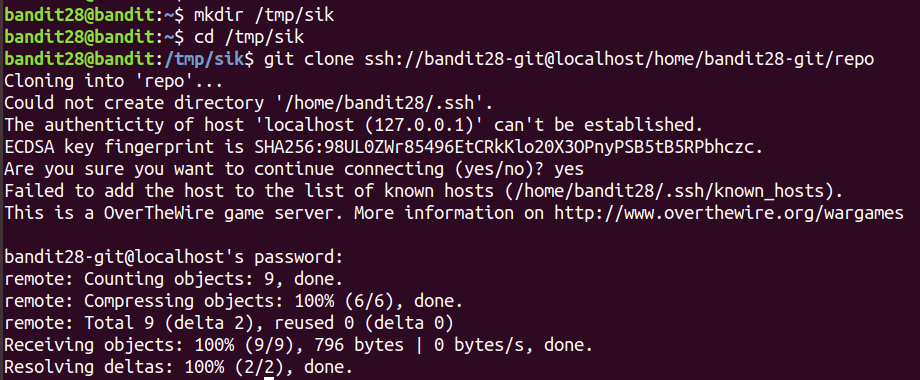
git파일을 내려받기 위해/tmp/sik폴더를 만들어 이동한뒤,git clone명령으로 문제에서 제시된 것을 내려받을 수 있습니다.
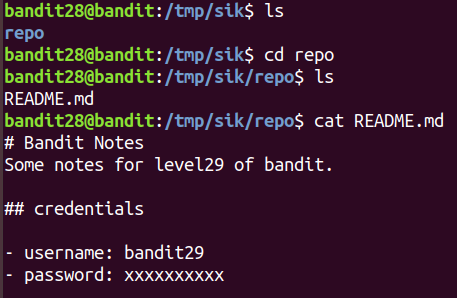
repo폴더 아래에README.md파일이 존재하고, 이를 읽어보면 password가xxxxxxxxxx로 되어있습니다.password가 변경되었던 것 같아
log를 확인해야 할 것 같습니다.
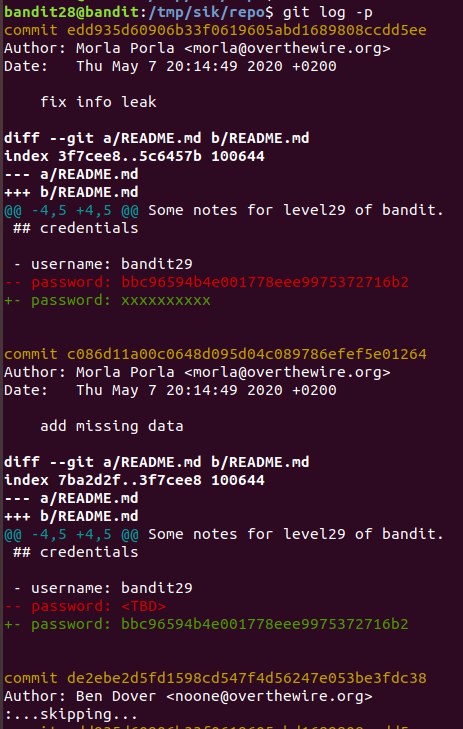
로그를 확인해보면 이전의 password를 확인할 수 있습니다.
핵심
usage: git [--version] [--help] [-C <path>] [-c name=value]            [--exec-path[=<path>]] [--html-path] [--man-path] [--info-path]            [-p | --paginate | --no-pager] [--no-replace-objects] [--bare]            [--git-dir=<path>] [--work-tree=<path>] [--namespace=<name>]            <command> [<args>]

These are common Git commands used in various situations:

start a working area (see also: git help tutorial)
clone      Clone a repository into a new directory
init       Create an empty Git repository or reinitialize an existing one

work on the current change (see also: git help everyday)
add        Add file contents to the index
mv         Move or rename a file, a directory, or a symlink
reset      Reset current HEAD to the specified state
rm         Remove files from the working tree and from the index

examine the history and state (see also: git help revisions)
bisect     Use binary search to find the commit that introduced a bug
grep       Print lines matching a pattern
log        Show commit logs
show       Show various types of objects
status     Show the working tree status

grow, mark and tweak your common history
branch     List, create, or delete branches
checkout   Switch branches or restore working tree files
commit     Record changes to the repository
diff       Show changes between commits, commit and working tree, etc
merge      Join two or more development histories together
rebase     Reapply commits on top of another base tip
tag        Create, list, delete or verify a tag object signed with GPG

collaborate (see also: git help workflows)
fetch      Download objects and refs from another repository
pull       Fetch from and integrate with another repository or a local branch
push       Update remote refs along with associated objects
댓글
이 글이 마음에 드셨다면 반응이나 댓글을 남겨주세요!
댓글을 작성하려면 로그인하세요
로딩 중...

뉴스레터 구독하기
새로운 포스트가 올라오면 이메일로 알려드려요!